fork

Old versions of Fork for macOS High Sierra 10.13 in 2025 — complete guide

If you have a MacBook Pro 2012–2017 and you are still on High Sierra, new versions of Fork (2.40+) simply crash. The official website and GitHub have long removed old releases, but the official CDN is still alive (checked on November 24, 2025).

100% working links to old versions (directly from cdn.fork.dev)

How to install (30 seconds)

  1. Download any DMG from the list above
  2. Open → drag Fork.app to “Applications”
  3. If macOS complains about “unknown developer” → System Preferences → Security & Privacy → “Open Anyway”
  4. Done! Trial works forever

Russian language

Fork → Preferences (Cmd + ,) → General → Language → Русский → restart.

How to set up auto-deployment to hosting (Beget, Timeweb, and any other)

  1. Open your website folder in Fork (File → Open)
  2. Once in Terminal, execute:
    • cd /path/to/website/folder
    • git init
    • git add .
    • git commit -m "First version"
  3. In Fork: Remote → Add deployment server…
  4. Fill in:
    • Protocol: SFTP
    • Host: your server (e.g., s123.beget.com)
    • Port: 2222 (Beget) or 22
    • SSH login and password
    • Path on the server: /home/login/www/domain.ru/ or /home/login/public_html/
  5. Click “Test Connection” → green checkmark → Save
  6. Now any commit → right-click → Deploy → your server → the site updates in seconds

You can enable auto-deploy: Preferences → Deploys → check “Deploy automatically after commit”.

Why this is still the best way in 2025

  • Complete change history locally
  • Rollback the site in 1 click
  • No folders _old, _final, _copy_2025
  • Works without internet
  • No need for GitHub/GitLab


prostoe-rukovodstvo-po-git-dlya-nachinayushhih

Simple Guide to Git Terms for Beginners

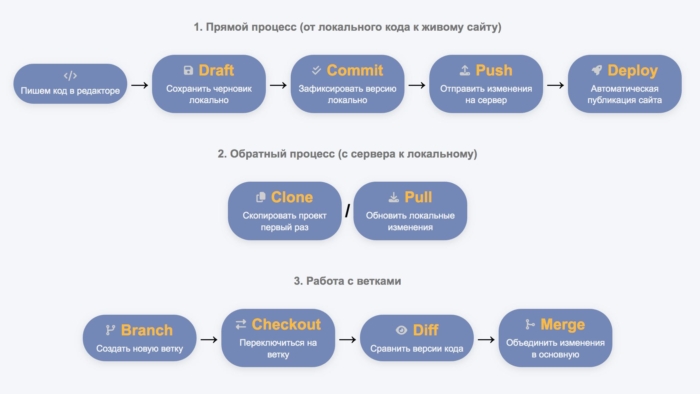
When you first start working with Git, all these new words — commit, push, pull, branch, merge — can be confusing and intimidating. You are used to just writing code, saving the file, and manually copying it to the server, and suddenly there are more than ten commands and concepts.

To make it easier to remember and understand, we have broken down the entire Git process into three logical chains:

  • Direct process — how your code goes from your local computer to the live site.
  • Reverse process — how to download code from the server to your machine.
  • Working with branches — how to safely experiment with new features.

Below is an interactive visualization. Click on the title/icon to go to a detailed explanation. Click on the text under the icon for a brief hint.

Git process visualization for beginners

Writing code
Just edit files in the editor. Git is not needed yet.
→

Draft

Save draft locally
Intermediate save via stash or WIP commit.
→

Commit

Save version locally
git add . + git commit -m "message"
Committing changes as a new version.
→

Push

Send version to the server
git push origin branch
Sending commits to the remote repository.
→

Deploy

Publishing code version
Automatic publication to the site after push (via hook).

Reverse process

Clone

Copy project for the first time
git clone https://...
Full copy of the repository with history.
/

Pull

Update local changes
git pull
Downloading and merging fresh changes from the server.

Working with branches

Branch

Create a new branch
git branch feature or git checkout -b feature
→

Checkout

Switch to a branch
git checkout or git switch branch
→

Diff

Compare code versions
git diff
View changes between versions.
→

Merge

Merge changes into main
git merge feature-branch
Merging the finished branch into main/master.

1. Direct process: from coding to live site

This is the main chain that you will use most often. Previously, you wrote code → saved it → manually copied it to the server. Now Git does this smarter and safer.

  • Coding
    Regular work in the editor (VS Code, Notepad++ etc.). Nothing new — just writing PHP, HTML, JS or whatever you have.

  • Draft
    This is an intermediate commit when you want to quickly save the current state, but it is not ready yet.
    Example: “Save draft locally”.
    Analogy: before you could save a file as index_temp.php. Now you just make a commit with the message “WIP: trying a new design”.
  • Commit
    The main step of recording changes. You tell Git: “Here is a completed piece of work, save it as a version”.
    Analogy: before a large change meant a new file index_2.0.php. Now it’s one file + the history of all versions inside Git.
  • Push
    Sending all your local commits to the remote repository.
    Analogy: before you manually uploaded files via FTP/SSH. Now with one command — everything goes to the server.
  • Deploy
    The moment when the code becomes a live website. On shared hosting like Beget, this happens automatically after a push thanks to a hook.
    Analogy: before files appeared on the website immediately after copying.

2. Reverse process: from server to local computer

When you need to continue working on another device or update the code after someone else’s changes.

  • Clone
    A complete copy of the entire repository from the server to your computer. You do this once at the beginning of the project.
    Analogy: download the entire website via FTP into a new folder.
  • Pull
    Downloading fresh changes from the server + automatic merging with your code.
    Analogy: manually download updated files from the server and replace yours.

3. Working with branches: safe experiments

Branches are Git’s superpower. They allow you to work on new features without breaking the main code.

  • Branch
    You create a separate line of development.
    Analogy: before you could copy the entire project to another folder for experiments. A branch is the same, but without duplicating files.
  • Checkout
    Switching to another branch to work in it.
    Analogy: opening another folder with code.
  • Diff
    Viewing differences between versions/branches. Git shows what has been added, removed, or changed.
    Analogy: manually comparing two files.
  • Merge
    Merging the completed branch into the main one (usually main or master).
    Analogy: manually copying successful changes from the test folder to the main one.

Conclusion

These three chains cover 90% of what you need at the start. Start with the direct process — set up Git on Beget, and within a day you’ll be pushing changes with one button instead of manual FTP. Over time, branches will become your best friend — no more index_old.php and index_new_test.php!

Keep this page as a cheat sheet. Once you get the hang of it — move on to more complex things like rebase or pull request.

Complete Guide to AI Tokens and Optimizations for Programmers

When I started actively using neural networks for programming, I encountered an unexpected problem: in the middle of working on a project, the AI would suddenly start to “forget” functions we had discussed five minutes earlier. It turned out that the issue was with tokens — specifically, how models process and store the context of our conversation. This article is the result of exploring various optimization approaches used by modern language models.

What are tokens and why are they important for programmers

A token is a unit of text that the AI processes in one step. Unlike words, tokens can be shorter or longer: one English word typically counts as 1.3 tokens, a Russian word is about 2 tokens, while a line of code can take anywhere from 5 to 15 tokens depending on its complexity. This means that a file with a thousand lines of code can easily turn into 15-30 thousand tokens, which is already a significant volume for many free models.

> The problem is that when we exceed the context window limit, the model starts to lose some information. It cannot simply “discard” the middle of the dialogue — usually, the oldest messages suffer. For a programmer, this means that the AI may forget the architecture of the project or the logic of functions written at the beginning of the session. It is especially frustrating when a long stack trace of an error consumes half of the available tokens, leaving little room for actually solving the problem.

Model Comparison: Tokens and Optimizations

There are many models on the market with different approaches to managing context. Some prefer to increase the window size, others compress information, and some use complex architectural solutions. The table below summarizes the main free models suitable for programming, indicating their context windows and key optimizations.

Model Context Window Key Optimizations Code Features
Kimi 2.5 Instant 256,000 Lossless Compression, KV-Cache Fast response, handles large databases [source]
Kimi 2.5 Thinking 256,000 Lossless Compression, Chain-of-Thought Deep reasoning without loss of context [source]
DeepSeek V3 64,000 (API: 128K) MoE (37B/671B active), FP8 Efficient processing, expert specialization [source] [source]
DeepSeek R1 64,000 MoE + Chain-of-Thought (32K output) Visible step-by-step thinking for algorithms [source]
DeepSeek V3.1 128,000 MoE + improved compression New version, replaces R1 [source]
Claude Sonnet 4.5 200,000 (beta: 1M) Context Compaction, Memory Tool, Extended Thinking Best for refactoring large projects [source] [source]
Grok 3 131,000 Real-Time Data, Hybrid Architecture Access to fresh data, Think/Big Brain modes [source]
ChatGPT (GPT-4o) 8,000 free / 128K Plus MQA/GQA, Sparse Attention Free tier is too small for serious code [source] [source]
Gemini 2.5 Pro 1,000,000 Multimodal Attention, 100% recall up to 530K Huge context for monolithic codebases [source]
Qwen 3.5-Plus 1,000,000 Tiered pricing, Thinking/Non-thinking modes 1M tokens with mode separation [source]
Qwen 3-Max 262,000 Context Cache, Tool Integration Context caching for repeated queries [source]
Qwen QwQ 131,000 Chain-of-Thought (32K CoT) Reasoning model, competitor to DeepSeek R1 [source]

How optimizations work in practice

Different models address the problem of limited resources in various ways. Some developers prefer to increase the context window to incredible sizes, others invent smart ways of compression, and others change the architecture of the neural network itself. Let’s explore the main approaches found in the table above.

Lossless context compression

Kimi uses a technique called lossless compression. This means that the model compresses text data in such a way that no information is lost — neither variable names, nor comments, nor code structure. The effect is similar to a zip archive: the data takes up less space in RAM, but can be fully unpacked when needed. This is important for a programmer because even the slightest loss of details in the code can lead to errors.

>Claude is taking a different approach with Context Compaction. When the dialogue approaches the token limit, the model automatically invokes a special tool that analyzes the conversation history and creates a compact summary. At the same time, Claude can create named memory blocks — for example, separately storing user preferences and separately describing the project architecture. This is similar to how a programmer takes notes in a notebook to avoid keeping everything in their head. Interestingly, this process takes a few seconds, and the user notices a slight pause before the response — it is at this moment that old messages are archived.

>

Mixture of Experts Architecture

>

DeepSeek uses a completely different approach called Mixture of Experts or MoE. Instead of activating all model parameters for each token, the neural network is divided into 256 separate “experts” — specialized subnetworks. When processing each token, a special router selects only 8 of the most suitable experts from the 256 available. As a result, only 37 billion of the 671 billion parameters are actively used, which is about five and a half percent of the total volume.

>

The experts do not specialize in subject areas like “physics” or “biology,” as is sometimes mistakenly believed, but rather in syntactic patterns. One expert works better with numbers, another with punctuation, and a third with technical terms. When a programmer asks a question about code, the experts who are well-versed in programming syntax and data structures are activated. This makes processing more efficient without sacrificing quality, and using the FP8 format for weights allows for additional memory savings.

>

Attention Mechanism Optimization

>

All modern transformers face the problem of quadratic complexity in the attention mechanism: each token must “look” at all other tokens in context. For long texts, this becomes a bottleneck. Developers have come up with several ways to optimize this process.

>

ChatGPT and GPT-4o use MQA and GQA techniques — Multi-Query Attention and Grouped-Query Attention. Typically, in a transformer, each attention “head” has its own keys and values, which requires a lot of memory. In MQA, all heads share the same keys and values, while in GQA, they are divided into groups. This allows for reducing cache memory consumption by eight times or more without significant loss of quality. KV caching is another important optimization, where keys and values for already processed tokens are saved and reused instead of being recalculated.

>

Deep Thinking Modes

>

Some tasks require not just a quick answer but step-by-step reasoning. For this, developers have created special modes that sacrifice speed for quality. DeepSeek R1 uses the Chain-of-Thought approach, where the model generates intermediate reasoning before the final answer. The user sees this thinking process, which helps understand the logic and adjust the question if necessary.

>Claude offers an Extended Thinking mode with an effort parameter that allows you to choose between low, medium, and high levels of effort. In high mode, the model can use up to 64,000 tokens for internal reasoning before providing a final answer. Grok 3 offers similar Think and Big Brain modes, which are manually activated by the user. Kimi in Thinking mode spends between 8 to 25 seconds on reflection while maintaining full context with 256,000 tokens.

Model Selection Recommendations

The choice of the appropriate model depends on the specific programming task. For working with large legacy projects, where you need to keep in mind tens of thousands of lines of code, Gemini 2.5 Pro or Kimi 2.5 with their huge context windows are ideal. Gemini can load an entire repository with a million tokens, while Kimi ensures accurate processing without loss due to lossless compression.

For developing complex algorithms and debugging logic, it is better to choose models with explicit Chain-of-Thought — DeepSeek R1 or Claude 4.5 Extended. They show the thought process, which helps to understand why the model suggests a particular solution. If speed of prototyping without loss of quality is important, consider Kimi Instant or DeepSeek V3 with their efficient MoE architecture.

Best choice for free use: If you do not want to pay for a subscription, the top 3 looks like this: Kimi 2.5 provides 256,000 tokens completely free, DeepSeek V3 offers 64-128 thousand with a powerful MoE architecture, and Qwen 3.5-Plus via Alibaba Cloud gives access to a million tokens within the free tier. Avoid ChatGPT Free with its meager eight thousand tokens — this is only enough for short snippets, but not for serious development.

Practical Tips for Working with Context

Regardless of the chosen model, there are several techniques that can help you use available tokens more effectively. Before sending code, it is worth removing unnecessary imports and comments — this saves 10-20 percent of the context. Instead of full files, it can sometimes be useful to send the module structure with descriptions of key functions. Breaking sessions into separate tasks also helps: it is better to start a new chat for a new feature than to try to fit everything into one overloaded dialogue.

Prioritizing context works like this: first, send critically important files that will definitely be needed for the response, and add supporting materials later. Thinking modes should only be activated when deep processing is truly needed — they consume additional tokens for internal reasoning. And remember that tokens are counted for everything: your request, previous history, system instructions, and the model’s response. The actual useful volume is always 20-30 percent less than stated.

Conclusion

Understanding the limitations and capabilities of different models allows you to choose the right tool for the specific task. There is no universally best model — there is only one that is suitable for your particular case. Some value the huge context of Gemini, others prefer the transparency of reasoning in DeepSeek, while some appreciate the smart memory management of Claude. The main thing is to remember about tokens and plan your work so that the AI does not lose the thread of the conversation at the most inconvenient moment.

Technologies are evolving rapidly: just a year ago, 128,000 tokens seemed fantastic, and today there are already models with million-token contexts. Keep an eye on updates, experiment with different approaches, and you will find the optimal balance between code quality and work efficiency.

Transforming articles into videos: ready-made services or custom solutions

>Whisper medium — работает на CPU, но требует больше времени

Заключение

Автоматическое преобразование текстов в видео с озвучкой открывает новые возможности для контент-креаторов и бизнеса. Выбор между готовыми решениями и созданием собственного сервиса зависит от ваших потребностей и бюджета.

>Montreal Forced Aligner — runs on CPU, average speed

Licensing for Commercial Use

When creating a commercial service, it is critically important to choose a TTS solution with the appropriate license.

Allowed for Commerce

  • Google Cloud TTS — paid API, commercial use included
  • Azure Speech Services — paid API, commerce allowed
  • Amazon Polly — paid API, commercial use OK
  • ElevenLabs — commercial plans available
  • Piper TTS — MIT License, commerce fully allowed

Require Attention

  • Coqui TTS — project closed, used MPL 2.0 (allowed commerce), but development has stopped

Recommendations for Commercial Project

To launch a commercial service on VDS without GPU, cloud APIs will be the optimal choice:

  • Minimal load on your server
  • Pay-as-you-go pricing model — pay only for usage
  • Fully legal for commercial use
  • High-quality speech synthesis
  • Built-in support for word-level timing
  • Reliability and scalability

Recommended for MVP

Google Cloud TTS or Amazon Polly — the best price-quality ratio at around $4 per million characters. This will allow you to quickly launch a prototype without significant investments in infrastructure.

Conclusion

The choice between a ready-made service and custom development depends on your goals. Ready-made solutions are suitable for a quick start and testing an idea, but creating your own service based on cloud APIs provides more flexibility, control over the process, and monetization opportunities. Key factors for success are the right choice of TTS with word-level timing and legally clean licensing for commercial use.

How to Transfer Products from a Telegram Channel to a Website Transferring products from a Telegram channel to a website can be a straightforward process if you follow these steps: Gather Product Information: Collect all necessary details about the products, such as names, descriptions, prices, and images. Choose a Platform: Decide on the website platform you will use to display the products, such as WordPress, Shopify, or a custom-built site. Use an API or Bot: If you have programming skills, consider using the Telegram API or creating a bot to automate the transfer of product information. Manual Entry: If automation is not an option, you can manually enter the product details into your website’s content management system. Organize Products: Categorize the products on your website for easier navigation and better user experience. Test the Website: Before launching, ensure that all product links, images, and descriptions are correctly displayed and functional. Promote Your Website: Once everything is set up, promote your website through your Telegram channel and other social media platforms. By following these steps, you can effectively transfer products from your Telegram channel to your website.

If you have a Telegram channel full of posts with products: images, descriptions, prices, all mixed up in chaotic text. Sometimes there are also congratulations or announcements that are completely unrelated. You need to transfer all this to a full-fledged website, say, on WordPress with WooCommerce. Sounds like a headache? In fact, with modern AI tools, this can be done quite easily and even automated. I will tell you how to approach this step by step, so your online store can shine with new products without unnecessary effort.

Getting Started: Exporting Data from Telegram

The first step is to extract all the data from the channel. If you are using the desktop version of Telegram, simply go to the channel settings and select the chat export option. You can save it in JSON or HTML format, which will give you a file with the text of the posts and links to images. The main problem here is the chaos: prices may be written as “1000 rub” or just “1k”, descriptions are mixed with titles, and there are also posts that are not about products. But don’t worry, AI will help sort all this out.

After exporting, upload the data to a file, for example, CSV. This will allow you to import it into WooCommerce. If the channel is large, with hundreds of posts, a manual approach will take hours, but with automation – just a day or two. The main thing is to filter out the unnecessary: remove posts without keywords like “price” or “buy” to avoid cluttering the database.

AI on Guard: Improving Descriptions and Attributes

Now for the most interesting part – using AI plugins for WordPress. Take, for example, WriteText.ai or AI Product Tools. These tools take your raw, chaotic text and turn it into coherent descriptions. Imagine: you upload a CSV with posts from Telegram, and AI automatically extracts the title, price, sizes, colors, and even material. If the text says something like “blue t-shirt M 500 rub”, the plugin will break it down into fields: color – blue, size – M, price – 500 rubles.

Such plugins integrate directly with WooCommerce, so you can process hundreds of products at once. They optimize the text for SEO, add meta tags, and even generate FAQs. If the text is too messy, you may need to tweak it manually sometimes, but in most cases, AI does a great job. Other options like Describely.ai or WP Sheet Editor with the AI module work similarly: you upload the data, start the process, and voila – ready products on the site.

Image Generation: When There Are No Photos or They Are Imperfect

What if the Telegram post has only text, without an image? Or the image is of low quality? Here, AI photo generators come to the rescue. Plugins like AI Product Image Generator or ContentGen AI take the product description and create realistic images. Based on the phrase “red leather bag with gold hardware,” they will create a professional photo that can be immediately uploaded to the product gallery.

These tools use models like DALL-E or Gemini, and they are royalty-free, so there are no copyright issues. In WooCommerce, the integration is simple: AI reads the text, generates the image, and adds alt texts for SEO. Of course, for complex products, the result may not be perfect, but for basic items, it’s a great option. Plugins like SmartWoo or Uncanny Automator allow you to automate this in the workflow: import the text – get the photo.

Nuances and Tips for Successful Transfer

Not everything is as smooth as it seems. First, check the compatibility of the plugins with your version of WooCommerce – the best version is 6.0 and above. Second, API keys for AI (from OpenAI or Google) may have limits, so for large volumes, consider a premium plan. Prices for plugins range from free with limitations to $20-50 per month.

Another point is legal: make sure that the products on the site comply with the laws, indicate the currency and taxes. And always check the result: AI is smart, but sometimes it confuses colors or sizes. If the channel is active, set up synchronization via API.

Telegram, so that new posts automatically appear on the website. As a result, with AI you will save a lot of time and make the store more attractive.

In conclusion, transferring products from Telegram to the website is not a nightmare, but an opportunity for growth. With the right tools, your channel will turn into a full-fledged e-commerce project. Try it, and you will see how AI simplifies life!